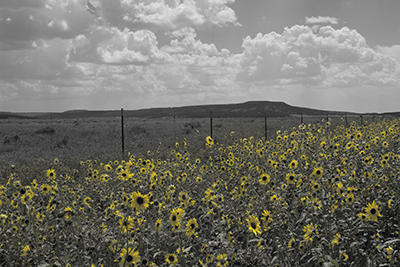
This week I learned a new trick in Photoshop called color splash. It allows you to convert an image to black and white while still retaining a splash of color. In this case there is nothing quite as dramatic as a black and white landscape. But in this image the flowers fade out in the conversion and we are left with a not very interesting image. On the other hand keeping the yellow in the sunflowers gives us the best of both worlds.
Easy enough to do. In Photoshop choose Selection/Color Range. In this case I was able to just choose yellow from the dropdown image to select the sunflowers. In some cases it works better to use the eyedropper tool to select your color or range of colors. I then inverted my selection so that everything except the sunflowers was selected because I wanted to make everything except the sunflowers black and white. I then added a black and white adjustment layer and voila! That easy. In this example I also adjusted the black and white layer by darkening the blues to bring out the mountains and the sky and adding a high contrast red filter to help bring out the clouds.